Open Source RMM Tools: The Complete Guide for 2026
The commercial RMM market has a structural problem for a significant portion of its users: per-device pricing that scales linearly with the thing you are supposed to be growing. Every endpoint you onboard increases your tool cost. Every client you win makes your margin thinner unless you raise prices to compensate. For MSPs running 50-500 endpoints, the math is tight enough that the RMM bill is a material factor in whether the business works.
Open-source RMM exists because enough people got tired of that math. But “open source” is not a monolith. The open-source RMM space ranges from single-purpose remote access tools to full-platform solutions with AI capabilities. The differences between them are significant enough that choosing the wrong one creates more problems than it solves.
This guide covers the open-source RMM landscape in 2026: what is available, what each project actually does, what self-hosting requires, and when open source is the right choice versus a commercial platform.
Why Open Source Matters for RMM
Before comparing projects, it is worth being precise about why open source matters specifically in the RMM context. The arguments for open-source RMM are not the same as the arguments for open-source databases or web servers. RMM has unique characteristics that make the open-source case particularly strong.
Transparency and Auditability
Your RMM agent runs as a system service with administrative privileges on every managed device. It can execute commands, install software, read files, capture screen content, and access system logs. You are deploying software with essentially unlimited access to your clients’ infrastructure.
With a closed-source RMM, you are trusting the vendor’s claims about what that agent does. You cannot verify that it only phones home to the vendor’s servers. You cannot audit the data collection to confirm it matches what the vendor documented. You cannot verify that the agent does not contain telemetry or data collection that was not disclosed. You are trusting the vendor completely, and the attack surface of that trust is every endpoint under management.
With an open-source RMM, you can read the agent code. You can audit exactly what data it collects, where it sends that data, and what commands it will accept. You can build the agent from source and verify that the binary you deploy matches the source you reviewed. This is not theoretical security theater — it is a meaningful reduction in supply chain risk for a component that has privileged access to your entire fleet.
No Vendor Lock-In
Every commercial RMM platform accumulates lock-in over time. Your monitoring configurations, automation scripts, alert rules, client hierarchies, and historical data all live in the vendor’s system. Switching platforms means rebuilding all of that — a multi-week project at small scale, a multi-month project at larger scale. The vendor knows this, which is why price increases after the initial contract are common. The switching cost is your leverage, and it does not work in your favor.
Open-source RMM reduces this lock-in in two ways. First, you own the data — it lives in your database, on your infrastructure, in a schema you can query and export from. Second, the platform itself can be forked. If the project takes a direction you disagree with, or development stalls, you have the codebase and can maintain it yourself or contribute to a community fork. That option does not exist with closed-source software.
Cost Structure
The obvious advantage. No per-device fees means your RMM cost does not scale with your endpoint count. Your infrastructure costs (servers, bandwidth) do scale, but at a much lower rate — a single server that costs $50-100/month can typically handle 500-1,000+ endpoints. Compare that to $1,500-2,500/month in per-device fees from a commercial vendor at the same scale.
The hidden cost is operational: you are responsible for hosting, updating, backing up, and troubleshooting the platform. That cost is real but predictable, and for technically capable teams, it is dramatically lower than the commercial alternative.
Compliance Positioning
A growing number of compliance frameworks and client contracts include requirements around software supply chain transparency. Being able to point to auditable source code for your primary management tool is a differentiator in compliance-sensitive industries. It is not sufficient on its own — you still need to demonstrate proper deployment, configuration, and operational practices — but it eliminates one category of audit question entirely.
The Open-Source RMM Landscape
Three projects dominate the open-source RMM space. They are at very different points in terms of scope, maturity, and target audience.
MeshCentral
MeshCentral is a remote management platform developed by Ylian Saint-Hilaire, originally at Intel and now maintained as an open-source project. It is the most mature open-source project in this space, with a large user base and active development.
What it does well. Remote desktop access is MeshCentral’s core strength, and it is genuinely excellent. Browser-based remote desktop with full keyboard/mouse control, file transfer, terminal access, and multi-monitor support. The implementation is fast, responsive, and works without installing client-side software beyond the MeshAgent. It supports Windows, macOS, Linux, and even FreeBSD. The web-based management interface is functional and scales well. Multi-user support with group-based permissions works for team environments. Intel AMT (Active Management Technology) integration enables hardware-level management for supported devices.
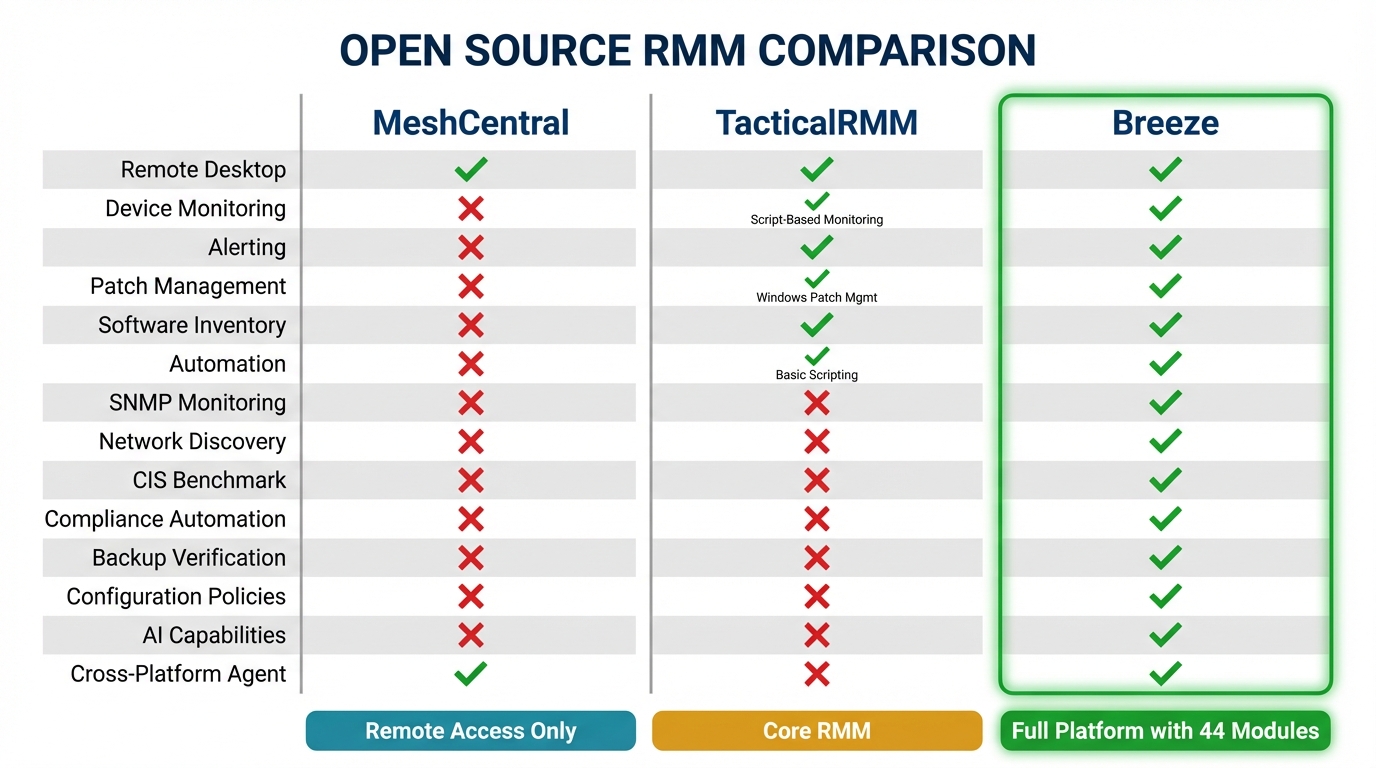
What it does not do. MeshCentral is not a full RMM. It does not include monitoring (CPU, memory, disk thresholds), alerting (notifications when something goes wrong), patch management, software inventory, compliance tooling, automation workflows, reporting, or configuration management. It is a remote access and command execution platform. If you need someone to restart a service or troubleshoot a problem remotely, MeshCentral handles that. If you need to know that the service stopped in the first place, you need something else.
Architecture. Node.js server, MeshAgent client (C-based, cross-platform). Stores data in NeDB or MongoDB. Can run on minimal hardware — a single VPS with 1-2 GB RAM handles hundreds of agents. Installation is straightforward with the included setup scripts.
Who should use it. IT teams that primarily need remote access and do not need monitoring, alerting, or automation. Shops that currently use TeamViewer, AnyDesk, or similar commercial remote access tools and want a self-hosted, no-per-device-fee alternative. Teams building their own management stack from components, with MeshCentral handling the remote access layer.
TacticalRMM
TacticalRMM is the most well-known open-source RMM project. It was built on top of MeshCentral (for remote access) and has grown into a capable platform with monitoring, scripting, automation, and patch management.
What it does well. Scripting is TacticalRMM’s strongest feature. The script engine supports PowerShell, Bash, Python, and batch files, with a script library, variable injection, and output capture. The community has built a large library of shared scripts. Monitoring with custom checks — you define the checks as scripts, TacticalRMM runs them on schedule and alerts based on exit codes or output. Automated tasks and scheduled scripts. Basic patch management for Windows. The web UI is clean and functional. Active community on Discord with good knowledge sharing.
What it does not do. SNMP monitoring, network device management, native compliance tooling, backup verification, disk encryption management, software deployment workflows, advanced reporting, CIS Benchmark assessment, vulnerability correlation (CVE scanning against software inventory), browser extension management, DNS security integration, or AI-driven automation. The monitoring is script-based rather than agent-native, which means you are writing and maintaining the checks yourself rather than having structured data collection built into the agent.
Architecture. Django backend (Python), Vue.js frontend, PostgreSQL database, MeshCentral for remote access, Golang agent for Windows and Linux. Deployment is Docker-based. The architecture is well-structured but the dependency chain (Django + PostgreSQL + MeshCentral + Redis + Celery + Nginx) means the hosting environment needs reasonable resources — 4 GB RAM minimum, 8 GB recommended.
Who should use it. MSPs that are comfortable with Linux administration and want a capable open-source RMM with good scripting. Teams that prioritize script-based automation and are willing to build their monitoring checks. Shops currently using MeshCentral that want to add monitoring and automation without switching to a commercial platform.
Breeze
Breeze is a full-platform open-source RMM built from scratch with an AI-native architecture. Full disclosure: we built it.
What it does. Breeze includes 44 modules covering the full RMM feature scope: device monitoring and management, patch management with lifecycle workflows, remote access, automation (event-driven, scheduled, webhook, manual), SNMP monitoring, network intelligence with auto-discovery, software inventory with NVD-correlated CVE scanning, CIS Benchmark assessment (200+ checks on Windows, 100+ macOS, 150+ Linux), compliance automation covering 13 of 18 CIS Controls, backup verification with test restores, browser extension risk classification, DNS security integration, configuration policies with hierarchical inheritance, maintenance windows, reporting and analytics, and an AI brain layer (through LanternOps) that provides correlation, triage, and autonomous action with risk classification.
The architecture is four layers — Go agent, PostgreSQL storage, Hono/TypeScript API, Claude Agent SDK brain — designed so the RMM is fully functional without the AI layer. You can run Breeze as a traditional RMM with no AI involvement. The brain multiplies what a technician can do but is not required for core function.
What it does not do as well as established platforms — yet. The PSA integration ecosystem is narrower than Datto or ConnectWise. The community is smaller and newer. Some vendor-specific integrations that mature platforms have accumulated over years are still in development.
Architecture. Go agent (cross-platform: Windows, macOS, Linux), PostgreSQL database, Hono/TypeScript API layer, optional AI brain via Claude Agent SDK. Self-hosted or cloud-hosted. The Go agent is lightweight and efficient. The API layer is comprehensive — every action the UI performs is available via API, which means integrations and automation have full platform access.
Who should use it. MSPs that want a complete RMM platform without per-device fees. Teams that need compliance automation and do not want to build it from scripts. Organizations that want AI-driven operations but need the underlying platform to work without AI as a fallback. Anyone who wants the transparency and control of open source with the feature depth of a commercial platform.
Comparison Matrix
| Capability | MeshCentral | TacticalRMM | Breeze |
|---|---|---|---|
| Remote desktop | Yes (native) | Yes (via MeshCentral) | Yes (native) |
| Device monitoring | No | Script-based | Agent-native |
| Alerting | No | Yes (script-based) | Yes (policy-driven) |
| Patch management | No | Windows only | Windows, macOS, Linux |
| Software inventory | No | Basic | Full with CVE correlation |
| Automation | No | Scripts + tasks | Event/schedule/webhook/manual |
| SNMP monitoring | No | No | Yes |
| Network discovery | No | No | Yes |
| CIS Benchmark | No | No | Yes (450+ checks) |
| Compliance automation | No | No | 13/18 CIS Controls |
| Backup verification | No | No | Yes |
| Configuration policies | No | No | Yes (hierarchical) |
| Reporting | No | Basic | Yes |
| AI capabilities | No | No | Yes (LanternOps) |
| Self-hosted | Yes | Yes | Yes |
| Cross-platform agent | Yes | Windows + Linux | Windows, macOS, Linux |
| API coverage | Partial | Good | Full |
Self-Hosting Considerations
Self-hosting an RMM is not the same as self-hosting a blog or a wiki. The RMM is a critical infrastructure component — if it goes down, you lose visibility into and management of your entire fleet. The self-hosting decision needs to account for operational reality.
Infrastructure Requirements
MeshCentral has the lightest requirements. A VPS with 1-2 GB RAM, 20 GB storage, and a public IP is sufficient for hundreds of agents. The Node.js server is efficient and the agent communication protocol is lightweight.
TacticalRMM needs more resources due to its component stack. The documentation recommends 4-8 GB RAM, and in practice, you want 8 GB for a production deployment with 200+ agents. Docker-based deployment simplifies the initial setup but adds its own operational overhead.
Breeze runs on comparable resources to TacticalRMM for the RMM layer. The Go agent is efficient on endpoints. PostgreSQL is the primary data store, and sizing depends on the number of endpoints and retention policy.
Operational Overhead
The real cost of self-hosting is not the server bill — it is the operational work. Updates, backups, monitoring the monitoring system, SSL certificate management, database maintenance, security patching of the host OS and dependencies.
For MeshCentral, this is minimal. Updates are straightforward, the application is stable, and the failure modes are well-understood.
For TacticalRMM, the Docker-based deployment means updates involve pulling new container images and restarting. The multi-component architecture means more potential failure points — a Redis issue, a Celery worker crash, a MeshCentral desync.
For Breeze, updates follow the same pattern as any containerized application. The single-database architecture (PostgreSQL) simplifies backup and recovery compared to multi-database setups.
Security Responsibility
When you self-host, you own the security of the platform. That includes: firewall configuration, TLS termination, database access controls, OS-level hardening, backup encryption, access logging, and incident response for the platform itself. If your RMM server is compromised, the attacker has administrative access to every managed endpoint. This is not a theoretical risk — RMM platforms have been targeted in supply chain attacks precisely because of this leverage.
The mitigations are standard but critical: keep the host OS updated, restrict network access to the RMM server, use strong authentication (MFA where supported), encrypt backups, monitor access logs, and have a response plan for platform compromise.
When Open Source Makes Sense
Open-source RMM is not universally better or worse than commercial alternatives. The decision depends on your specific situation.
Open source makes sense when:
- Per-device pricing is a material constraint on your margin
- You have the technical capability to self-host and maintain infrastructure
- Your clients have data sovereignty requirements that eliminate cloud-only options
- You want to audit the software that has administrative access to your fleet
- You want to avoid vendor lock-in and maintain control of your data
- You need compliance capabilities but cannot afford the enterprise commercial platforms that include them
Commercial makes sense when:
- You do not have the technical depth or desire to manage hosting infrastructure
- You need vendor-backed SLAs for uptime and support
- Your PSA integration requirements are specific to a particular vendor’s ecosystem
- The per-device cost is not a material factor in your business economics
- You value phone support for troubleshooting over community-based support
The hybrid approach: several open-source projects, including Breeze, offer both self-hosted and cloud-hosted options. This gives you the transparency and auditability of open source with the operational convenience of a managed deployment. You can start cloud-hosted and migrate to self-hosted later if your requirements change, or run a hybrid where some clients are managed through the cloud instance and compliance-sensitive clients are managed through a self-hosted instance.
The Trajectory of Open-Source RMM
Three years ago, recommending an open-source RMM to an MSP required significant caveats about feature gaps and operational overhead. The landscape has changed meaningfully.
MeshCentral continues to be the best open-source remote access solution available — better than many commercial alternatives — and its stability and maturity make it a reliable component in any stack.
TacticalRMM has proven that a community-driven open-source RMM can achieve feature parity with commercial platforms in core areas like scripting, monitoring, and basic patch management. The project’s growth demonstrates real demand for open-source alternatives.
Breeze represents the next phase: an open-source RMM that does not just match commercial feature lists but advances the architecture — structured data collection for AI consumption, risk-classified autonomous actions, compliance automation that runs continuously rather than on demand. The 44-module feature set closes the gap that previously required combining multiple tools or accepting limitations.
The trend is clear. Open-source RMM options are getting more capable faster than commercial platforms are reducing their prices. For small and mid-size MSPs, the gap between “what I get from open source” and “what I get from commercial” is narrowing every quarter. The gap between “what I pay for open source” and “what I pay for commercial” is not narrowing at all.
If you have been waiting for open-source RMM to be “ready,” the wait is over. The question now is which project matches your requirements and operational model.
Explore Breeze’s full feature set at /features, see the pricing at /pricing, compare it against other platforms at /compare, or go straight to the source at github.com/breezermm/breeze.