Best RMM Software for Small MSPs in 2026
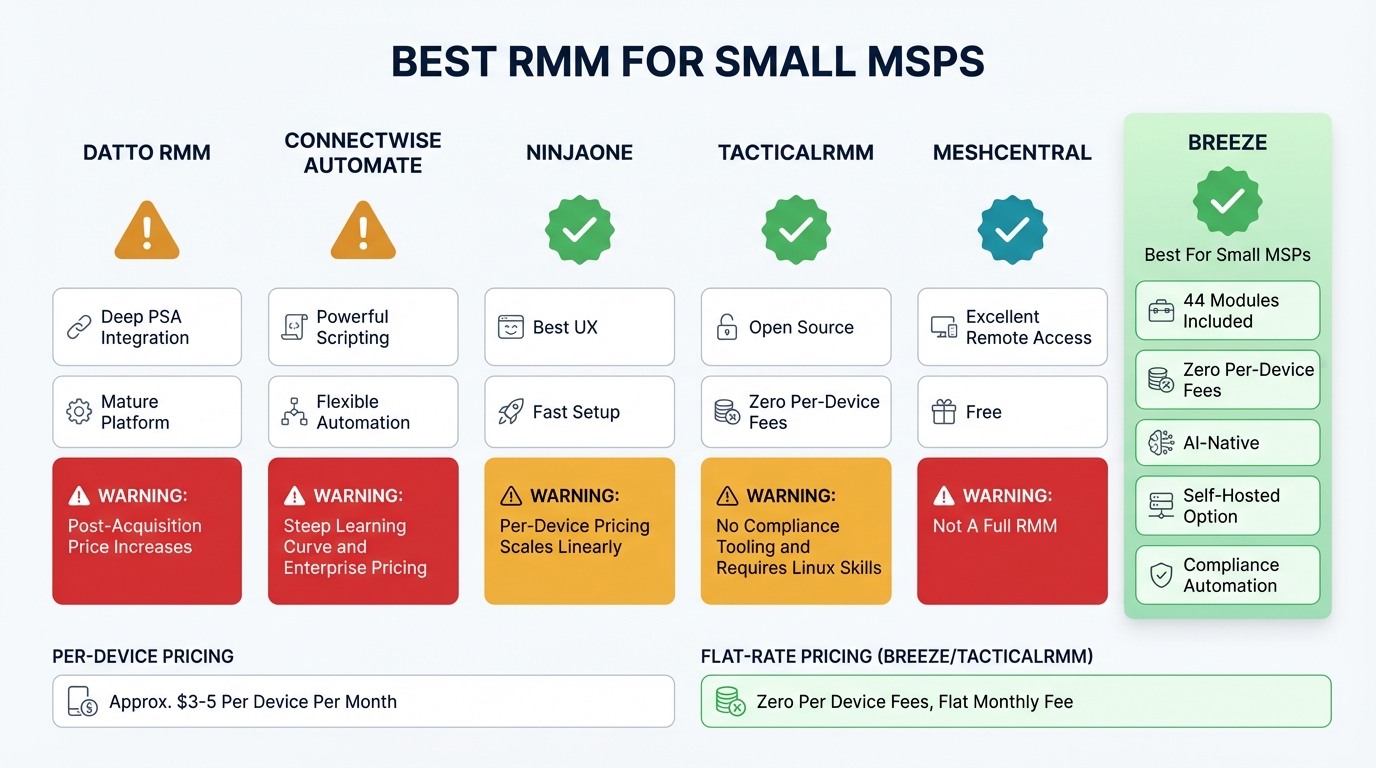
Running a small MSP is an exercise in margin management. You have one to ten technicians, somewhere between 50 and 500 endpoints under management, and every dollar you spend on tooling comes directly out of the margin that keeps the business alive. The RMM platform is the single largest tooling decision you will make, and getting it wrong costs you in three ways: the direct cost of the platform, the indirect cost of working around its limitations, and the opportunity cost of features you need but do not have.
This post evaluates the RMM landscape from the perspective of a small MSP in 2026. Not a theoretical comparison of feature lists — an honest assessment of what each platform actually delivers at the scale where most MSPs operate.
What Small MSPs Actually Need
Before comparing platforms, it is worth being precise about what a small MSP needs from its RMM. The requirements are different from an enterprise IT team or a large MSP with 50 technicians and dedicated engineering staff.
Predictable, margin-friendly pricing. Per-device pricing is the standard model, and it is the model that hurts small MSPs the most. If you charge a client $150/month for managed services and your RMM costs $3/device/month, a 50-endpoint client costs you $150/month just for the RMM. That is before PSA costs, backup costs, security tool costs, and your technician’s salary. The math gets brutal fast.
All the features, not the upsell. Large MSPs can absorb the cost of add-on modules — $2/device for patch management, $3/device for remote access, $1.50/device for backup monitoring. Small MSPs cannot. When the RMM vendor charges separately for every feature you need, the “affordable” base price becomes a fiction. You need a platform where the full feature set is included in the base cost.
Compliance out of the box. Your clients increasingly need to demonstrate compliance with CIS Controls, NIST CSF, HIPAA, or state-level privacy regulations. If your RMM does not collect compliance-relevant data automatically — and retain it with proper audit trails — you are building that evidence manually. At small scale, “building it manually” means it does not get done, which means you cannot sell compliance services, which is where the margins are.
Automation that reduces headcount requirements. A small MSP cannot hire its way out of operational bottlenecks. If a routine task takes five minutes and happens twenty times a day, that is an hour and forty minutes of technician time consumed by something a computer should handle. The RMM’s automation engine determines how much of your team’s day is spent on routine work versus work that actually requires human judgment.
Multi-tenancy that works at small scale. You need clean client separation, but you do not need the complexity of an enterprise RBAC system with fourteen role types. You need: each client’s data is isolated, you can give clients limited access to their own dashboard, and a junior tech can be scoped to specific clients. That is the feature set. Anything beyond that is complexity you will not use.
A self-hosted option. Not every small MSP needs self-hosting. But the ones that serve government, healthcare, or financial clients may need it, and discovering that your RMM vendor does not offer it after you have already built your business on their platform is a painful conversation.
The Landscape: An Honest Assessment
Datto RMM (now Kaseya)
Datto was the default recommendation for small MSPs for years, primarily because of its integration with Autotask PSA and its backup products. The Kaseya acquisition changed the equation.
Strengths. Deep PSA integration if you are in the Kaseya ecosystem. Mature platform with broad feature coverage. Large community and extensive documentation. The monitoring and alerting system is solid.
Weaknesses. Pricing has increased significantly post-acquisition, and the per-device model hits small MSPs hard. The platform bundles RMM with other Kaseya products in ways that make it difficult to use standalone. The UI has not aged well — it works, but it is not fast. API coverage is adequate but not comprehensive. The Kaseya ecosystem increasingly feels like a walled garden: easy to get into, expensive to get out of. Vendor lock-in is a real concern.
For small MSPs specifically: the cost at small scale is high relative to what you get, and the bundling strategy means you are paying for capabilities you may not need.
ConnectWise Automate (formerly LabTech)
ConnectWise Automate is the power-user tool in the RMM space. It can do almost anything, if you are willing to invest the time to configure it.
Strengths. Extremely flexible scripting and automation. Deep integration with ConnectWise Manage (PSA). The monitor and alert system is highly configurable. If you have the technical depth to set it up properly, it is one of the most capable platforms available.
Weaknesses. The learning curve is steep — genuinely steep, not marketing-copy steep. A small MSP without a dedicated engineer to configure and maintain Automate will underutilize it significantly. The pricing is enterprise-oriented. The interface is complex and can feel overwhelming for teams that just need to manage endpoints efficiently. Setup time to production readiness is measured in weeks, not days.
For small MSPs specifically: unless you have someone on the team who already knows Automate, the ramp-up time and complexity are disproportionate to the value you will extract at small scale. This is a tool for MSPs with 10+ technicians and a dedicated operations person.
NinjaOne (formerly NinjaRMM)
NinjaOne has been the fastest-growing RMM platform in recent years, and the growth is earned. The product is well-designed, the UX is genuinely good, and the feature set covers most of what a small MSP needs.
Strengths. Best-in-class user interface. Fast setup — you can be operational in hours, not days. Good patch management. Solid remote access built in. The support team is responsive. The API is decent and improving. For a small MSP that values time-to-value and does not want to spend weeks configuring the platform, NinjaOne is a strong option.
Weaknesses. Per-device pricing, which scales linearly with your endpoint count. Some features that should be included — like advanced reporting, disk encryption management, and certain integrations — are add-ons. The automation engine is functional but not as deep as ConnectWise Automate. Self-hosting is not available. The platform is cloud-only, which eliminates clients with data sovereignty requirements.
For small MSPs specifically: probably the best commercial option if you accept per-device pricing. The fast setup and clean interface mean you spend less time fighting the tool and more time servicing clients. The cost becomes the pain point as you grow.
TacticalRMM
TacticalRMM is the most prominent open-source RMM project. It is built on MeshCentral for remote access and has a capable scripting system with good community support.
Strengths. Open source with no per-device fees. Self-hostable. Active community. Good scripting and automation capabilities. Built on MeshCentral, which is a solid remote access foundation. If you are technically capable and willing to self-host, TacticalRMM eliminates the per-device cost that constrains small MSPs.
Weaknesses. Limited feature set compared to commercial platforms. No native compliance tooling. No AI or intelligent automation. Monitoring is basic compared to what Datto or NinjaOne provide. The platform requires meaningful Linux administration knowledge to deploy and maintain. There is no vendor support — you rely on the community and your own expertise. No native mobile device management. Missing features like SNMP monitoring, network intelligence, and advanced reporting that commercial platforms include.
For small MSPs specifically: good option if you have Linux administration skills and your clients do not require compliance reporting. The per-device cost savings are real. The hidden cost is the time you spend administering the platform instead of servicing clients.
MeshCentral
MeshCentral is not a full RMM — it is a remote access and management platform. It is included in this comparison because many small MSPs use it as their primary tool, and TacticalRMM is built on top of it.
Strengths. Completely free and open source. Excellent remote access — full desktop, terminal, file transfer. Self-hostable. The web-based interface works well. For pure remote access needs, it is the best free option available.
Weaknesses. It is not an RMM. No monitoring, no alerting, no patch management, no compliance, no automation, no reporting. If you use MeshCentral as your primary tool, you are building the rest of your stack from scratch — combining it with custom scripts, separate monitoring tools, and manual processes. That works at very small scale (10-20 endpoints) and breaks as you grow.
For small MSPs specifically: a reasonable starting point if you are just getting started and managing a handful of devices. Not a long-term solution for a growing MSP.
Breeze
Full disclosure: we built Breeze, so take this assessment with appropriate calibration. We will be specific about what it does and where it is today.
Strengths. Zero per-device fees — every endpoint is included regardless of pricing tier. All 44 modules are included in every deployment, including features that other platforms sell as add-ons: patch management, remote access, backup verification, compliance automation, network intelligence, SNMP monitoring. Open source with a self-hosted option. AI-native architecture — the platform was designed from the foundation for AI agent consumption, not retrofitted. Compliance automation covers 13 of 18 CIS Controls at “Strong” implementation. The AI brain (through LanternOps) handles correlation, triage, and routine remediation that would otherwise require technician time.
Weaknesses. Breeze is newer than the established players. The community is smaller than TacticalRMM’s or NinjaOne’s. Some integrations that mature platforms have — specific PSA connectors, specific backup vendor integrations — are still in development. If you need deep integration with a specific PSA today, verify that it exists before committing.
For small MSPs specifically: the pricing model is the headline — zero per-device fees means your RMM cost does not scale linearly with your endpoint count, which fundamentally changes the margin math. The compliance automation and AI capabilities mean a small team can deliver services that would normally require more headcount. The self-hosted option opens client segments (government, healthcare) that cloud-only platforms cannot serve.
The Pricing Math That Actually Matters
Pricing comparisons based on published rates are misleading because most RMM vendors do not publish transparent pricing. But the structural differences in pricing models are what matter for small MSP economics.
Per-device model (Datto, NinjaOne, ConnectWise): assume $3-5/device/month as a realistic range when you include the add-on features you actually need. At 200 endpoints, that is $600-$1,000/month. At 500 endpoints, $1,500-$2,500/month. This cost scales linearly and eats into your margin as you grow.
Per-technician model: some platforms charge per technician seat instead. This is better for margin math because your technician count grows more slowly than your endpoint count. But per-technician pricing often comes with endpoint caps or feature restrictions.
Flat-rate model (Breeze): the RMM cost does not change based on endpoint count. Your margin on each new client improves as you grow because your tool cost stays fixed while your revenue increases. At small scale, this might be comparable to per-device pricing. At 200+ endpoints, the savings become significant. At 500+, they are transformative.
Run the math for your specific situation. Take your current RMM cost, divide by your total managed endpoints, and multiply by your projected endpoint count in 12 months. Then compare that to the flat-rate cost. The difference is margin you are either keeping or giving to your RMM vendor.
Check /pricing for current Breeze pricing details.
What to Prioritize When Choosing
If you are a small MSP evaluating RMM platforms today, here is the prioritization that will serve you best:
First: pricing model. Not the sticker price — the model. Will your costs scale linearly with growth, or do they stay predictable? This determines your business economics more than any feature comparison.
Second: time to value. How long does it take from signing up to having the platform operational with agents deployed, monitoring configured, and alerts tuned? If the answer is “weeks,” you are paying for setup time that produces no revenue. The best platforms get you operational in a day.
Third: automation depth. Every hour your automation engine saves is an hour your technician can spend on billable work or client relationships. The automation engine is not a nice-to-have — it is the leverage that lets a small team operate at the scale of a larger one.
Fourth: compliance capabilities. Compliance services are the fastest-growing revenue category for MSPs. If your RMM cannot support compliance evidence collection out of the box, you either cannot sell those services or you are building the evidence collection manually, which is not scalable.
Fifth: exit cost. Every platform has lock-in, but the degree varies. Open-source platforms with self-hosting options have the lowest lock-in. Proprietary platforms that bundle RMM with PSA, backup, and security tools have the highest. Consider what it would cost to switch platforms in two years. If the answer is “catastrophic,” that is a risk factor, not a feature.
The Recommendation
For small MSPs in 2026, the evaluation comes down to what you are optimizing for.
If you want the easiest setup with the best UX and are willing to accept per-device pricing, NinjaOne is the strongest commercial option. It works well, the support is good, and the time-to-value is fast.
If you want full control, zero per-device costs, and the ability to self-host, and you have a technically capable team, TacticalRMM is a solid open-source option with the caveat that you are trading cost for operational overhead.
If you want zero per-device fees, the full feature set without add-ons, compliance automation, AI-driven operations, and the option to self-host — Breeze is what we built to solve exactly this problem. The pricing model is designed for small MSP economics. The feature set is designed so you do not need five other tools. The AI brain is designed to multiply what a small team can accomplish.
We are biased. We built it. But we built it because we looked at the same landscape you are looking at and concluded that none of the existing options were optimized for the team with three technicians, 200 endpoints, and margins that matter.
See the full feature comparison at /compare, explore the feature set at /features, or see how Breeze fits the MSP use case specifically at /use-cases/msp.